






HP Deskjet Ink Advantage 5075 AIO Printer - M2U86C | price in dubai UAE EMEA saudi arabia

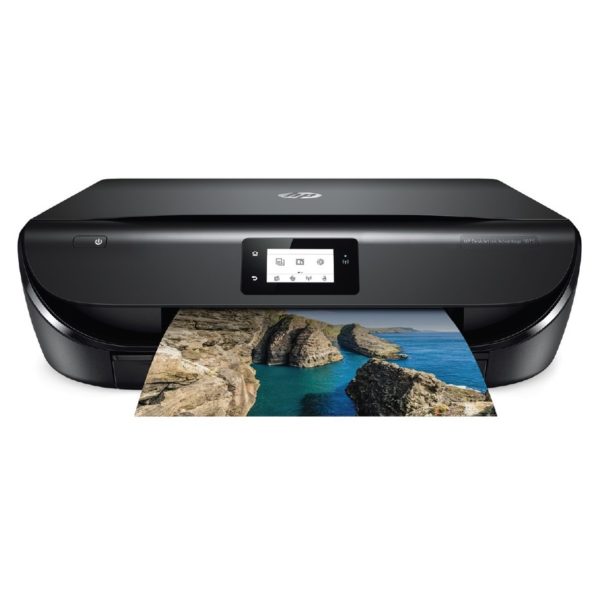
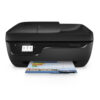
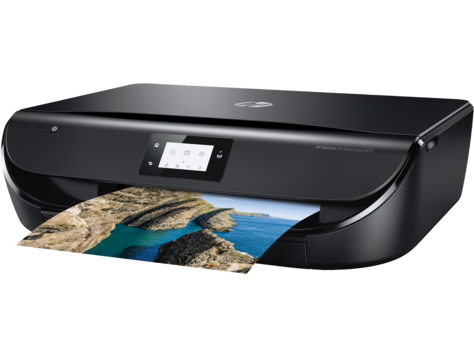
HP Deskjet Ink Advantage 5075 AIO Printer – M2U86C

Brand: HP

For The Immediate delivery requirement contact sales team. Usually Ship in 2-3 days Back to Back 4-5 Weeks, images are for illustration purposes only, Image may differ from actual product.

Secure Payment

Secure Transaction

Service Center Warranty

Shop Location

WhatsApp

AED 387.00 excl. VAT

Best Price: AED 387.00 on Credit / Debit card / Cash Payment (AED 0.00)

Out of stock product

For urgent delivery, please contact sales before ordering. Orders usually ship as per the estimated delivery date in certain case backorders may take 4–12 weeks. Images are for illustration only and may differ from the actual item.
6 + 0 =
SKU: M2U86C Category: Tag:

HP Deskjet Ink Advantage 5075 AIO Printer – M2U86C


HP DeskJet Ink Advantage 5075 All-in-One Printer


Overview


Get affordable prints and increased versatility. Set up, connect, and print right from your smartphone,1 and produce high-quality photos and everyday documents with low-priced ink cartridges. Print, scan, and copy with ease.
Dynamic security enabled printer. Intended to be used with cartridges using only HP original electronic circuitry. Cartridges with modified or non-HP electronic circuitry may not work, and those that work today may not work in the future.
https://www.hp.com/go/learnaboutsupplies

Features

Wireless connectivity you can count on

Get simple Wi-Fi® setup in less than a minute, and start printing fast.3
Have confidence in your connection with steady performance from dual band Wi-Fi®.2
Scan on the go, print from social media and the cloud, and easily order ink, with the HP Smart app.4
Easily print from a variety of smartphones and tablets.1

More ink, more prints

Print up to twice as many pages or photos with Original HP high-yield ink cartridges.5
Make an impression with Original HP ink cartridges – designed to deliver vivid color and crisp, sharp text.
Create high-quality borderless photos and flyers – right in your home.

Quick and easy. Print. Scan. Copy.

Print scan, and copy with fast speeds, and keep tasks moving.
Speed through multipage print jobs with automatic two-sided printing.
Create timesaving shortcuts and easily print, scan, and copy directly at the printer.


Specification


Functions

Functions
  • Print, copy, scan, photo
Multitasking supported
No


Printing specifications

Print speed black:
ISO: Up to 10 ppm
Draft: Up to 20 ppm 5
Print speed color:
ISO:Up to 7 ppm
Draft:Up to 17 ppm 5
First page out (ready)
Black: As fast as 16 sec
Color: As fast as 19 sec 6
Duty cycle (monthly, A4)
Up to 1250 pages 7
Printer drivers included
  • HP PCL3 GUI
Print quality (best)
Color: Up to 4800 x 1200 optimized dpi color (when printing from a computer on selected HP photo papers and 1200 input dpi)
Black: Up to 1200 x 1200 rendered dpi (when printing from a computer)
Display
  • 5.5 cm (2.2″) Hi-Res Mono LCD
Processor speed
  • 800 MHz
Number of print cartridges
  • 2 (1 black, 1 Tri-color [cyan, magenta, yellow])
Print languages
  • HP PCL3 GUI
Automatic paper sensor
  • No


Connectivity

Wireless capability
  • Yes
Connectivity, standard
  • 1 Hi-Speed USB 2.0
  • 1 WiFi 802.11n (dual band)
Minimum system requirements
  • Microsoft® Windows 10, 8.1, 8, 7: 1 GHz 32-bit (x86) or 64-bit (x64) processor, 2 GB available hard disk space, CD-ROM/DVD drive or Internet connection, USB port, Microsoft® Internet Explorer.
  • OS X v10.10 Yosemite, OS X v10.11 El Capitan, OS X v10.12 Sierra, 1 GB HD, Internet
Compatible operating systems
Microsoft® Windows® 10, 8.1, 8, 7
Windows Vista 64-bit
Windows Vista® 32-bit
OS X v10.10 Yosemite
OS X v10.11 El Capitan
macOS Sierra v10.12 (previously OS X)
Windows® XP (32-bit) SP2
Windows Server 2008 32-bit (SP1 or greater)
Windows Server 2008 64-bit (SP1 or greater)
Windows Server 2008 R2 64-bit
Windows Server 2008 R2 64-bit (SP1)
Windows Server 2012 64-bit
Windows Server 2012 R2 64-bit
Windows Server 2016
(Microsoft® Windows® 10, 8.1, 8, 7; Windows Vista 64-bit; Windows Vista® 32-bit; OS X v10.10 Yosemite; OS X v10.11 El Capitan; macOS Sierra v10.12 (previously OS X); Windows® XP (32-bit) SP2; Windows Server 2008 32-bit (SP1 or greater); Windows Server 2008 64-bit (SP1 or greater); Windows Server 2008 R2 64-bit; Windows Server 2008 R2 64-bit (SP1); Windows Server 2012 64-bit; Windows Server 2012 R2 64-bit; Windows Server 2016)


Mobility

Mobile printing capability
Features wireless direct and local Wi-Fi connectivity to enable mobile printing via HP Smart App, HP ePrint, Apple AirPrint™ as well as other solutions
Mopria-certified. Supports printing from most smartphones and tablets using these operating systems: Android, iOS, Blackberry, Symbian, Windows 10, Windows 8, and Windows RT. 4


Memory Specifications

Memory, standard
256 MB DDR3L Memory
Maximum Memory
  • 256 MB DDR3L Memory


Paper handling

Paper handling input, standard
  • Up to 100 sheets input tray
Paper handling input, optional
  • NA
Paper handling output, standard
  • 25-sheet output tray
Paper handling output, optional
  • NA
Duplex printing
  • Automatic (standard)
Media sizes supported
  • A4
  • A5
  • B5
  • DL
  • C6
  • A6
Media sizes custom
  • Simplex: 76.2 x 127 mm to 216x594mm
  • Duplex: 76.2 x 127 mm to 216x594mm
Media types
  • Plain Paper
  • HP Photo Papers
  • HP Matte Brochure or Professional Paper
  • HP Matte Presentation Paper
  • HP Glossy Brochure or Professional Paper
  • Other Photo Inkjet Papers
  • Other Matte Inkjet Papers
  • Other Glossy Inkjet Papers
  • Plain Paper, Light/Recycled
Media weights, recommended
75 g/m²
Media weights, supported
  • A4: 60 to 90 g/m²
  • HP envelopes: 75 to 90 g/m²
  • HP cards: up to 200 g/m²
  • HP 10 x 15 cm photo paper: up to 300 g/m²
Borderless printing
  • Yes (up to 8.5 x 11 in, 216 x 297 mm)


Scanner specifications

Scanner type
  • Flatbed
Scan file format
  • RAW, JPG, PDF
Scan resolution, optical
  • Upto 1200 Ppi
Scan size, maximum
  • 216 x 297 mm
Scan size (ADF), maximum
  • Does Not Apply
Automatic document feeder capacity
  • NA
Digital sending standard features
  • No
File Format Supported
  • PDF
  • BMP
  • PNG
  • TIF
  • JPG
Scan input modes
  • Front Panel, HP Scan software, Mobile app
Scan speed (normal, A4)
3 ppm color 7 ppm mono


Copier specifications

Copy resolution (black text)
  • 600 x 300 dpi
Copy resolution (color text and graphics)
  • 600 x 300 dpi


Power and operating requirements

Power
  • Input voltage: 100 to 240 VAC (+/- 10%), 50/60 Hz, 0.7A
Power consumption
Up to 14 watts (Printing), 3.75 watts (Ready), 0.89 watts (Sleep), 0.11 watts (Off) 3
Operating temperature range
  • 5 to 40°C


Dimensions and weight

Minimum dimensions (W x D x H)
445 x 367 x 128 mm 1
Maximum dimensions (W x D x H)
445 x 564 x 128 mm 1
Weight
5.41 kg
Package weight
  • 6.45 kg


What’s included

What’s in the box
  • HP DeskJet Ink Advantage 5075 All-in-One Printer
  • HP 680 Setup Black Ink Cartridge (~480 pages)
  • HP 680 Setup Tri-color Ink Cartridge (~150 pages)
  • Ink Flyer, Power Cord. [For ink volume and page yield information,visit hp.com/go/learnaboutsupplies]
Cable included
  • Please purchase USB cable separately
Replacement cartridges
  • F6V27AA HP 680 Black Ink Original Cartridge (~480 pages)
  • F6V26AA HP 680 Tri-color Original Ink Cartridge (~150 pages). Average based on ISO/IEC 24711 or HP testing methodology and continuous printing. Actual yield varies considerably based on content of printed pages and other factors. For details see https://www.hp.com/go/
Software included
  • HP Printer Software, HP Photo Creations
Warranty
  • 1 Year Limited Warranty (Return to HP/Dealer – Unit Exchange)


Reviews

There are no reviews yet.

Be the first to review “HP Deskjet Ink Advantage 5075 AIO Printer – M2U86C”