




Shop by Category




Special Promotion
Special Promotion


Special Promotion

Brand: Synology
Call for Price
For urgent delivery, please contact sales before ordering. Orders usually ship as per the estimated delivery date in certain case backorders may take 4–12 weeks. Images are for illustration only and may differ from the actual item.
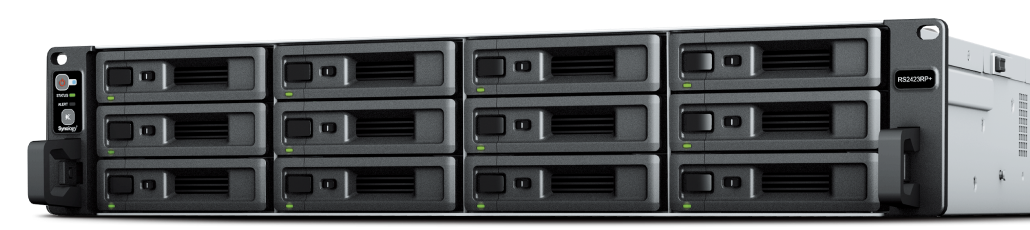
Efficient storage for centralized data management
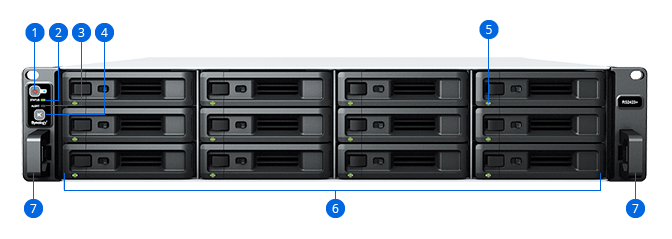
1. Power Button and Indicator
2. Status Indicator
3. Alert Indicator
4. Mute Button
5. Drive Status Indicators
6. Drive Trays
7. Rail Kit Release Tabs
8. Power Port
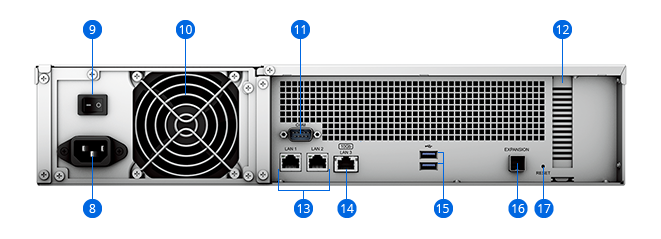
9. PSU on/off switch
10. PSU fans
11. Console Port
12. PCI Express Expansion Slot
13. 1GbE RJ-45 Ports
14. 10GbE RJ-45 Port
15. USB 3.2 Gen 1 Ports
16. Expansion Port
17. Reset Button


The RS2423RP+/RS2423+ offer exceptional performance with over 155K/79K random read/write IOPS and up to 3,500/1,700 MB/s sequential read/write throughput.2 They are the perfect cost-effective file management and sharing solution for SMBs and come equipped with advanced backup capabilities designed for businesses with expanding data needs.
*compared to predecessor RS2421+
*compared to predecessor RS2421+

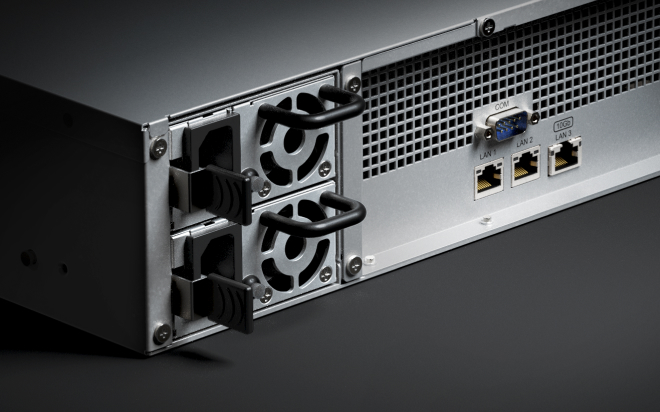
The RS2423RP+ and RS2423+ come with one 10GbE RJ-45 port and two Gigabit RJ-45 ports, which can be bonded with Link Aggregation to enable automatic network failover and load balancing.
Two RS2423RP+/RS2423+ units can be paired using Synology High Availability to form a reliable active-passive server cluster, maximizing service uptime.
The RS2423RP+ also features redundant and hot-swappable power supply units to protect service continuity in case there are issues with one power source.
Easily adjust the 2U 12-bay RS2423RP+/RS2423+ to match the usage of your environment, whether it needs performance, faster networking, or higher storage capacity.
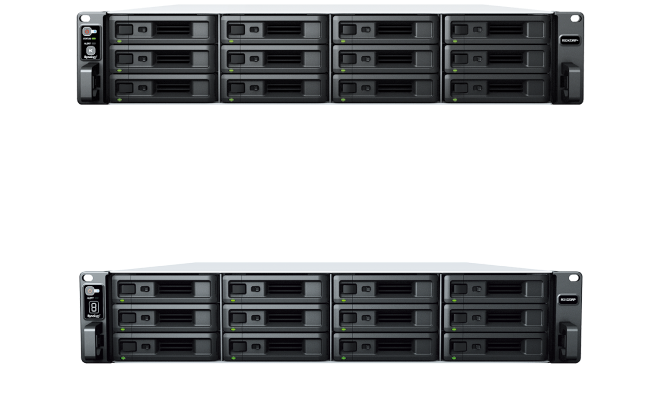
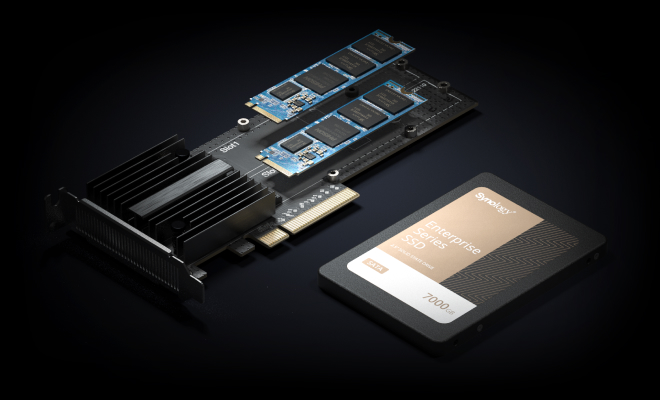
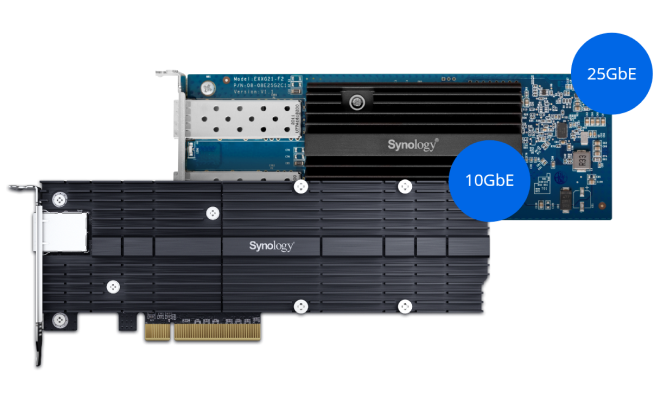

The RS2423RP+/RS2423+ are ideal for small to medium-sized businesses and branch offices seeking a high-performing, reliable, and cost-efficient storage solution for file management, data backup, and surveillance.

Provide secure and convenient cross-platform file access, sharing, and synchronization across multiple locations.
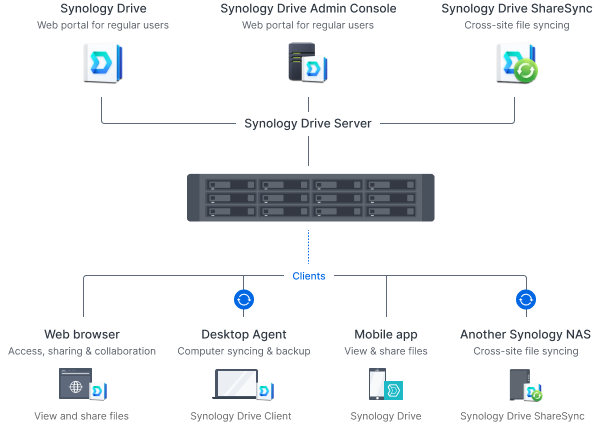
Synology Drive provides remote data access, synchronization, on-demand file restoration, and backup via handy desktop and mobile applications.Learn more
Access personal and shared data from mobile apps, desktop clients, web browsers, or another Synology system. Any changes you make are automatically synced to other devices as soon as they are connected.
Enable concurrent editing of documents, spreadsheets, and slides with Synology Office, with support for conversion to and from Microsoft Word, Excel, PowerPoint, and OpenDocument files.Learn more
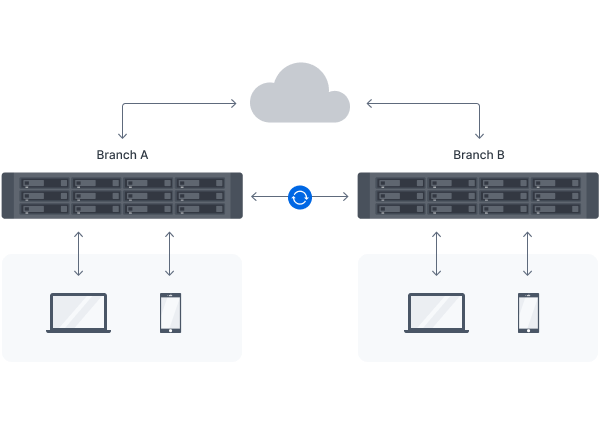
Use Hybrid Share to store large sets of data in the cloud, leveraging the large bandwidth of our data centers to stream requested files to local NAS deployed at the branch offices.6Learn more
With Hybrid Share-enabled folders, remote teams retain full access to the most up-to-date files while benefiting from a reduced local storage footprint and lower bandwidth usage.
Frequently-accessed files are kept on the local NAS, allowing users to access them at LAN speeds. Files and folders can also be pinned manually to prevent them from being replaced when the cache is full.

Design an effective backup strategy to maximize data and system availability with a host of native and license-free solutions.
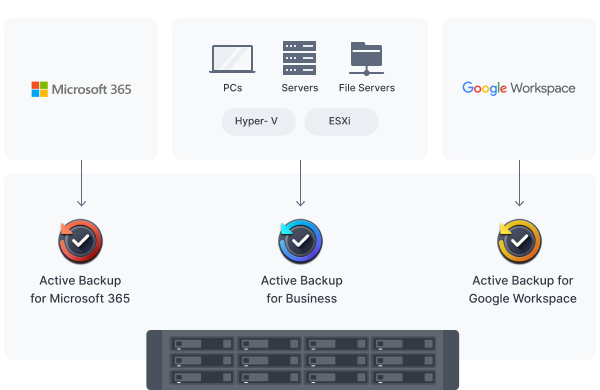
Securely back up Windows, Mac, and Linux endpoints, Synology servers, and VMware® and Hyper-V® virtual machines with Active Backup for Business.Learn more
Centralize backups of Microsoft 365 and Google Workspace data to protect cloud data from accidents and simplify compliance with data retention policies. Schedulable backups, flexible file versioning, and block-level deduplication ensure flexibility and savings in terms of storage and bandwidth consumption.Learn more
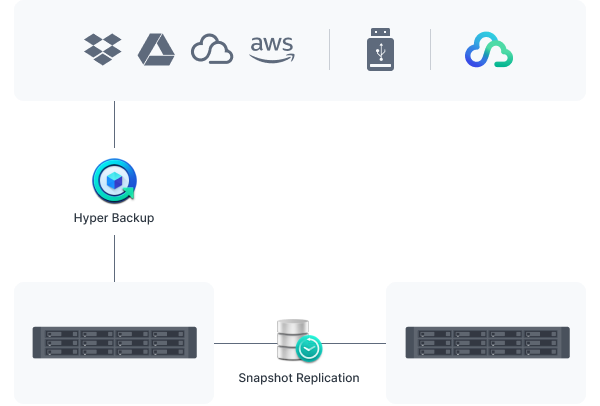
Back up files, LUNs, installed applications, and system configurations to destinations including Synology C2 Storage,6public cloud platforms, USB devices, file servers, local folders, and other Synology systems.
Set and forget backup tasks with regular schedules, enhance security with granular user permissions and encryption, keep backup sizes small with built-in deduplication, and restore data flexibly with multi-versioning.
Snapshot Replication enables configurable point-in-time snapshots of shared folders and VM storage with an RPO as low as 5 minutes and recovery within seconds.Learn more

Leverage flexible deployment options, intuitive management capabilities, and advanced video analytics to secure your premises.
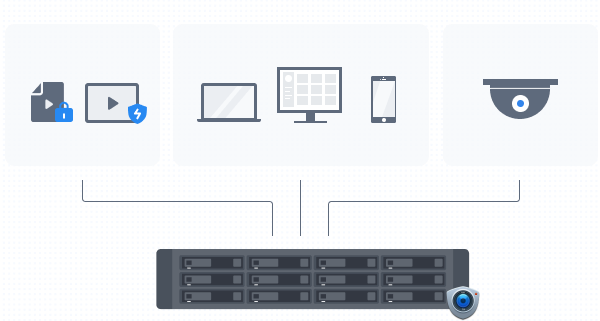
Connect up to 75 IP cameras from a selection of over 8,600 validated models thanks to Synology Surveillance Station’s wide camera compatibility.7
Monitor live streams or watch recordings from web browsers, desktop clients, or the DS cam mobile app.
Footage is stored locally for easier compliance with data protection regulations and further protected from unauthorized access with industry-standard AES-256 encryption.
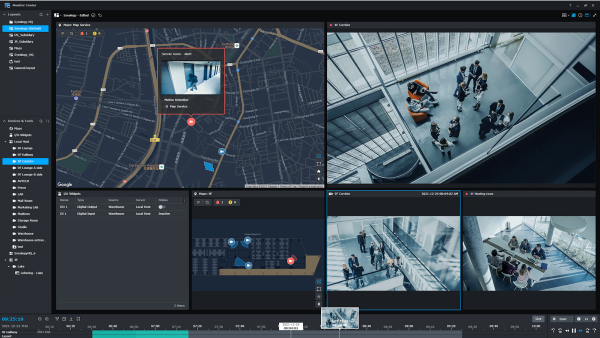
Automatically locate new cameras within a set IP range, and configure units in batch via spreadsheet import or replicating settings to new cameras.
Stay on top of your deployment by previewing triggered events directly on multi-floor or multi-location maps, with online map integration for Google Maps and OpenStreetMap.
Take advantage of intelligent monitoring features such as motion detection, no-idle zones, foreign object detection, and anomaly detection that cater to common surveillance scenarios.
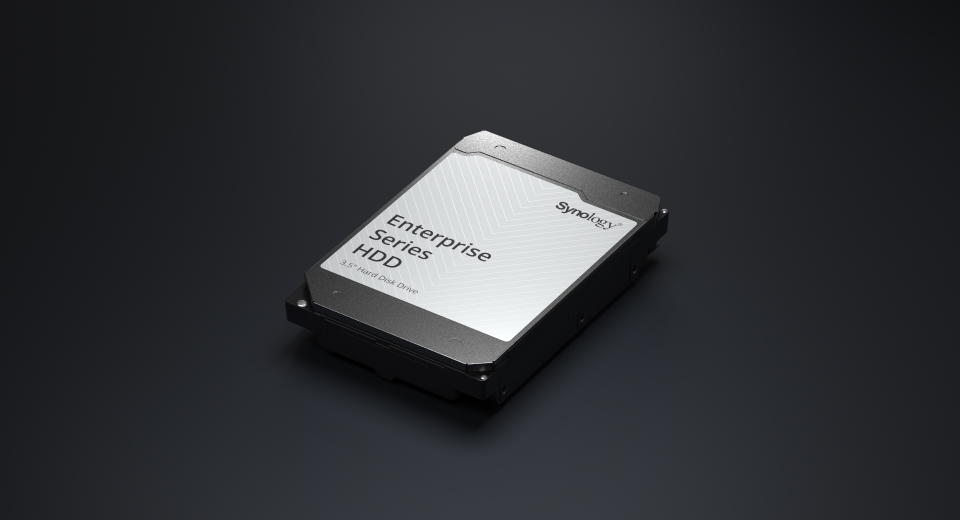
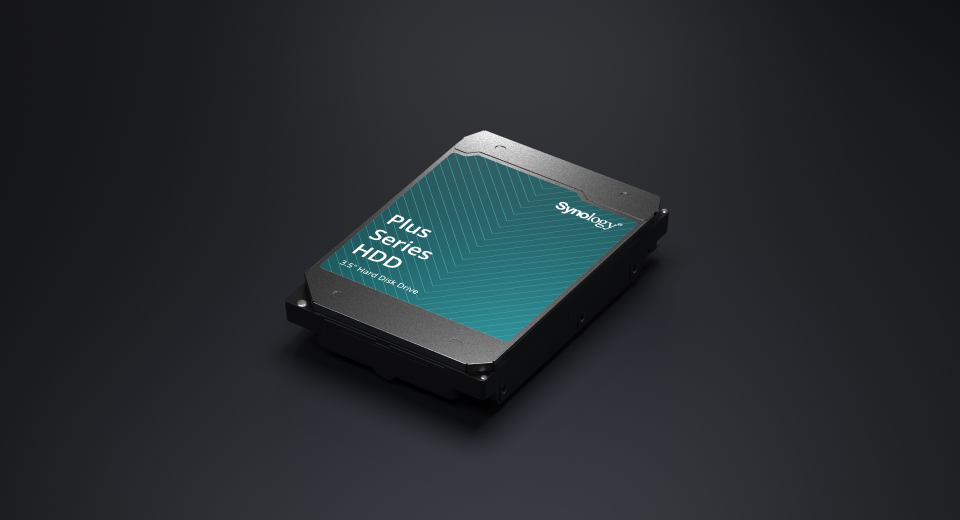
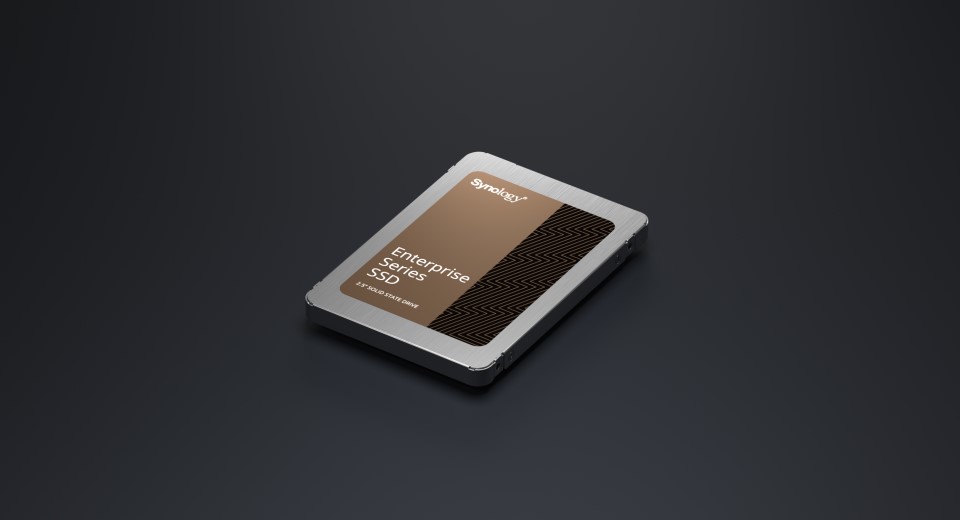
Designed for Synology systems, Synology drives deliver consistent performance and unmatched reliability for your deployments.2
Take advantage of a host of native productivity, management, and security solutions available in the web-based Synology DSM operating system.

Conveniently manage your fleet of Synology NAS from a centralized console.

Shield your Synology NAS from the most sophisticated threats with industry-leading security solutions.

Real-time system-level protection with automatic failover mechanism to maximize service availability.
| Hardware Specifications | RS2423+ | ||
| CPU | CPU Model | AMD Ryzen V1780B | |
| CPU Quantity | 1 | ||
| CPU Core | 4 | ||
| CPU Architecture | 64-bit | ||
| CPU Frequency | 3.35 (base) / 3.6 (turbo) GHz | ||
| Hardware Encryption Engine | |||
| Memory | System Memory | 8 GB DDR4 ECC UDIMM | |
| Memory Module Pre-installed | 8 GB (8 GB x 1) | ||
| Total Memory Slots | 2 | ||
| Maximum Memory Capacity | 32 GB (16 GB x 2) | ||
| Notes | Synology reserves the right to replace memory modules with the same or higher frequency based on supplier's product life cycle status. Rest assured that the compatibility and stability have been strictly verified with the same benchmark to ensure identical performance. | ||
| Please select Synology memory modules for optimum compatibility and reliability. Synology will not provide complete product warranty or technical support if non-Synology memory modules are used for memory expansion. | |||
| For multi-module memory configurations, all modules must be identical and share the same model number. Check the Product Manual of your Synology product for recommended memory configurations. | |||
| Storage | Drive Bays | 12 | |
| Maximum Drive Bays with Expansion Unit | 24 (RX1223RP x 1) | ||
| Drive Type (See all supported drives) | 3.5" SATA HDD | ||
| 2.5" SATA SSD | |||
| Hot Swappable Drive* | |||
| Notes | Synology only guarantees full functionality, reliability, and performance for Synology drives listed on the compatibility list. The use of non-validated components may limit certain functionality and result in data loss and system instability. | ||
| External Ports | RJ-45 1GbE LAN Port | 2 | |
| RJ-45 10GbE LAN Port | 1 | ||
| USB 3.2 Gen 1 Port | 2 | ||
| Expansion Port | 1 | ||
| Expansion Port Type | Mini-SAS HD | ||
| Notes | This device's 1GbE LAN ports have a maximum transmission unit (MTU) size of 1,500 bytes. | ||
| PCIe | PCIe Expansion | 1 x Gen3 x8 slot (x4 link) | |
| Appearance | Form Factor (RU) | 2U | |
| Size (Height x Width x Depth) | 88 mm x 482 mm x 552 mm | ||
| Weight | 11.5 kg | ||
| Rack Installation Support* | 4-post 19" rack (Synology Rail Kit - RKS-02) | ||
| Notes | The rail kit is sold separately | ||
| Others | System Fan | 60 mm x 60 mm x 3 pcs | |
| Fan Speed Mode | Full-Speed Mode | ||
| Cool Mode | |||
| Quiet Mode | |||
| Easy Replacement System Fan | |||
| Power Recovery | |||
| Noise Level* | 52.3 dB(A) | ||
| Scheduled Power On / Off | |||
| Wake on LAN / WAN | |||
| Power Supply Unit / Adapter | 500 watts | ||
| Redundant Power Supply | - | ||
| AC Input Power Voltage | 100 V to 240 V AC | ||
| Power Frequency | 50/60 Hz, Single Phase | ||
| Power Consumption | 119.95 watts (Access) | ||
| 46.21 watts (HDD Hibernation) | |||
| British Thermal Unit | 409.56 BTU/hr (Access) | ||
| 157.78 BTU/hr (HDD Hibernation) | |||
| Notes | For more information on how power consumption is measured, refer to this article. | ||
| Noise testing was conducted with the Synology system fully installed with Synology SATA SSDs and in an idle state. Two G.R.A.S. type 40AE microphones were placed at a 1 m distance from the front and rear of the device. Background noise: 16.49-17.51 dB(A); Temperature: 24.25-25.75˚C; Humidity: 58.2-61.8%. | |||
| Temperature | Operating Temperature | 0°C to 35°C (32°F to 95°F) | |
| Storage Temperature | -20°C to 60°C (-5°F to 140°F) | ||
| Operating Humidity | 8% to 80% RH | ||
| Storage Humidity | 5% to 95% RH | ||
| Certification | FCC | ||
| CE | |||
| BSMI | |||
| VCCI | |||
| RCM | |||
| UKCA | |||
| EAC | |||
| CCC | |||
| KC | |||
| UL | |||
| Warranty | 3-year hardware warranty, extendable to 5 years with EW202 or Extended Warranty Plus | ||
| Notes | The warranty period starts from the purchase date as stated on your purchase receipt. (Learn more) | ||
| Extended Warranty Plus is only available in Europe and North America. EW201/EW202 is only available in Asia, Africa, and Oceania. For exact availability information please visit their respective websites. | |||
| Environment | RoHS Compliant | ||
| Packaging Content | Main Unit X 1 | ||
| Accessory Pack X 1 | |||
| AC Power Cord X 1 | |||
| Quick Installation Guide X 1 | |||
| Optional Accessories | DDR4 ECC UDIMM: D4EU01-8G/D4EU02-16G | ||
| Expansion Units: RX1223RP | |||
| Enterprise Series 3.5" SATA HDD: HAT5300 Series | |||
| Plus Series 3.5" SATA HDD: HAT3300 Series | |||
| Enterprise Series 2.5" SATA SSD: SAT5200 Series | |||
| M.2 SSD & 10GbE Combo Adapter Card: E10M20-T1 | |||
| M.2 SSD Adapter Card: M2D20 | |||
| 25GbE Network Interface Card: E25G30-F2 | |||
| 10GbE Network Interface Card: E10G30-F2/E10G30-T2/E10G18-T1 | |||
| Rail Kit Sliding: RKS-02 | |||
| Notes | For multi-module memory configurations, all modules must be identical and share the same model number. Check the Product Manual of your Synology product for recommended memory configurations. | ||
| Certain items may not be available in your location. Please contact your local distributors for more information. | |||
| DSM Specifications | RS2423+ | ||
| Storage Management | Maximum Single Volume Size | 200 TB (32 GB memory required) | |
| 108 TB | |||
| Maximum Internal Volume Number | 64 | ||
| SSD Read/Write Cache (Determining cache size) | |||
| SSD TRIM | |||
| Supported RAID Type | Synology Hybrid RAID | ||
| Basic | |||
| JBOD | |||
| RAID 0 | |||
| RAID 1 | |||
| RAID 5 | |||
| RAID 6 | |||
| RAID 10 | |||
| RAID Migration | Basic to RAID 1 | ||
| Basic to RAID 5 | |||
| RAID 1 to RAID 5 | |||
| RAID 5 to RAID 6 | |||
| Volume Expansion with Larger HDDs | Synology Hybrid RAID | ||
| RAID 1 | |||
| RAID 5 | |||
| RAID 6 | |||
| RAID 10 | |||
| Volume Expansion by Adding a HDD | Synology Hybrid RAID | ||
| JBOD | |||
| RAID 5 | |||
| RAID 6 | |||
| Global Hot Spare Supported RAID Type | Synology Hybrid RAID | ||
| RAID 1 | |||
| RAID 5 | |||
| RAID 6 | |||
| RAID 10 | |||
| Notes | Actual maximum storage pool and volume sizes depend on drive sizes used, the number of drive bays available, and the RAID configuration. | ||
| Usable capacity for each volume will be lower than the maximum volume size and is dependent on the filesystem and the amount of system metadata stored. | |||
| Volumes over 108 TB require DSM 7.2-64570 or above and 32 GB of memory or more. | |||
| File System | Internal Drives | Btrfs | |
| ext4 | |||
| External Drives | Btrfs | ||
| ext4 | |||
| ext3 | |||
| FAT32 | |||
| NTFS | |||
| HFS+ | |||
| exFAT | |||
| File Services | File Protocol | SMB | |
| AFP | |||
| NFS | |||
| FTP | |||
| WebDAV | |||
| Rsync | |||
| Maximum Number of SMB Connections (FSCT-Based) | 380 | ||
| Windows Access Control List (ACL) Integration | |||
| NFS Kerberos Authentication | |||
| Notes | Connection value of this model is tested with Synology SATA HDD fully populated and all onboard network ports | ||
| Models with expandable memory are tested with the maximum supported quantity installed. | |||
| SMB performance was evaluated using Microsoft File Server Capacity Tool (FSCT) version 1.3, with the following configuration: | |||
| Test workload: HomeFolder scenario provided by the FSCT tool | |||
| Test duration: 600 seconds | |||
| Domain controller & FSCT controller: Windows Server 2022 | |||
| FSCT clients: 8 × Windows 10 machines | |||
| SMB feature: Directory leasing enabled | |||
| Account & Shared Folder | Maximum Local User Accounts | 1,024 | |
| Maximum Local Groups | 256 | ||
| Maximum Shared Folder | 256 | ||
| Maximum Shared Folder Sync Tasks | 12 | ||
| Hybrid Share | Maximum Hybrid Share Folders | 10 | |
| Hyper Backup | Folder and Package Backup | ||
| Entire System Backup | |||
| Notes | Full-system backup requires DSM 7.2 or later. | ||
| High Availability | Synology High Availability | ||
| Log Center | |||
| Syslog Events per Second | 1,000 | ||
| Virtualization | VMware vSphere | ESXi 8.0 U2, ESXi 8.0 U1, ESXi 8.0, ESXi 7.0 U3, ESXi 7.0 U2, ESXi 7.0 U1, ESXi 7.0, ESXi 6.7 U3, ESXi 6.7 U2, ESXi 6.7 U1, ESXi 6.7, ESXi 6.5 U3, ESXi 6.5 U2, ESXi 6.5 U1, ESXi 6.5 | |
| Microsoft Hyper-V | Windows Server 2022 | ||
| Citrix XenServer | XenServer 8, Citrix Hypervisor 8.2 LTSR CU1 | ||
| OpenStack | Cinder | ||
| General Specifications | Supported Protocols | SMB1 (CIFS), SMB2, SMB3, NFSv3, NFSv4, NFSv4.1, NFS Kerberized sessions, iSCSI, HTTP, HTTPs, FTP, SNMP, LDAP, CalDAV | |
| Supported Browsers | Chrome | ||
| Firefox | |||
| Edge | |||
| Safari | |||
| Supported Language | English, Deutsch, Français, Italiano, Español, Dansk, Norsk, Svenska, Nederlands, Русский, Polski, Magyar, Português do Brasil, Português Europeu, Türkçe, Český, ภาษาไทย, 日本語, 한국어, 繁體中文, 简体中文 | ||
| Notes | For an updated list of supported browser versions, check the DSM Technical Specifications. | ||
| Add-on Packages view the complete package list | |||
| Central Management System | |||
| Synology AI Console | |||
| Third-Party AI Model Integration | |||
| Maximum De-Identification Rate | 380 words per second | ||
| Notes | De-identification performance measurement: Filters for Credit Card Numbers, IBAN, Individual Taxpayer Identification Number, SSN, and Names applied to a 4,355-word English text. | ||
| To enable de-identification, your device must have at least 8 GB of memory and Container Manager installed. | |||
| Synology Chat | |||
| Maximum Number of Users | 150 | ||
| Notes | Measured with simulated users, each with an average record of 20,000 messages, emojis, or stickers. The required server response time is below ten seconds. | ||
| Models with expandable memory are tested with the maximum supported quantity installed. | |||
| Download Station | |||
| Maximum Concurrent Download Tasks | 80 | ||
| SAN Manager | |||
| Maximum iSCSI Target Number | 64 | ||
| Maximum LUN | 128 | ||
| LUN Clone/Snapshot, Windows ODX | |||
| Synology MailPlus / MailPlus Server | |||
| Free Email Accounts | 5 (Additional accounts require purchase of licenses) | ||
| Maximum Number of Users | 790 | ||
| Notes | The suggested maximum number of users is based on the following workload: 20% of users with a 20,000 item mailbox randomly performing actions and receiving 240 emails per day, and 80% of users receiving 20 emails per day. Learn more | ||
| Models with SSD support are tested with a single SSD volume. | |||
| Models with expandable memory are tested with the maximum supported quantity installed. Learn more about memory requirements. | |||
| Operating in high-availability mode will incur additional overhead. | |||
| Features enabled during evaluation: anti-spam, anti-virus, DNSBL, greylist, content scanning, and full-text search (English). | |||
| Media Server | |||
| DLNA Compliance | |||
| Synology Photos | |||
| Facial Recognition | |||
| Object Recognition | |||
| Snapshot Replication | |||
| Maximum Snapshots per Shared Folder | 256 | ||
| Maximum Snapshots per LUN | 64 | ||
| Maximum Snapshots per System | 4,096 | ||
| Maximum Replication Tasks for Shared Folders | 32 | ||
| Maximum Replication Tasks for LUNs | 16 | ||
| Maximum Replication Tasks per System | 32 | ||
| Surveillance Station | |||
| Default Licenses | 2 (Additional cameras require purchase of licenses) | ||
| Maximum IP Cameras and Total FPS (H.264) | 1080p: 75 channels, 2100 FPS | ||
| 3M: 75 channels, 1500 FPS | |||
| 5M: 75 channels, 900 FPS | |||
| 4K: 55 channels, 550 FPS | |||
| Maximum IP Cameras and Total FPS (H.265) | 1080p: 75 channels, 2250 FPS | ||
| 3M: 75 channels, 2250 FPS | |||
| 5M: 75 channels, 1500 FPS | |||
| 4K: 75 channels, 900 FPS | |||
| Notes | Surveillance Station 9.1.3 or above is required to support the maximum IP cameras and FPS figures listed. | ||
| Performance figures are obtained from testing conducted with the device fully populated with drives, with their default memory configuration, and under a continuous recording setup. Actual system capabilities may vary based on configuration, drive performance, enabled features, and the presence of additional workloads. | |||
| Use NVR Selector to quickly find a suitable model based on your requirements. | |||
| The number of video channels that can be viewed simultaneously is double the maximum number of cameras for the same codec and resolution. | |||
| Synology Drive | |||
| Maximum Number of Users | 680 | ||
| Maximum Number of Hosted Files | 5,000,000 (applies to files indexed or hosted by Synology Drive. For file access through other standard protocols, refer to the File Services section above) | ||
| Notes | The suggested maximum number of users is based on the following workload: 20% of users randomly perform file operations (upload, download, move, and delete), and 80% of users are logged in but idle. Learn more | ||
| Models with SSD support are tested with a single SSD volume. | |||
| Models with expandable memory are tested with the maximum supported quantity installed. | |||
| Exceeding the recommended numbers above will not block application operations, but may result in longer response time. | |||
| Btrfs file system and non-encrypted shared folders were used during the aforementioned testing. | |||
| Synology Office | |||
| Maximum Number of Users | 660 | ||
| Notes | The suggested maximum number of users is based on the following workload: 20% of users are executing random actions at an average of 30-second intervals, and 80% of users are logged in and viewing a file. Learn more | ||
| Models with SSD support are tested with a single SSD volume. | |||
| Models with expandable memory are tested with the maximum supported quantity installed. | |||
| Client performance may affect maximum simultaneous editing users. Client PCs used for testing: Intel Core i3-3220 / 8GB RAM | |||
| Virtual Machine Manager | |||
| Recommended Virtual Machine Instances | 8 (Learn more) | ||
| Recommended Virtual DSM Number (Licenses required) | 8 (including 1 Free License) | ||
| Notes | The specifications vary depending on system configuration and memory size. | ||
| VPN Server | |||
| Maximum Connections | 12 | ||











Reviews
There are no reviews yet.